Pixivの検索結果にて特定ユーザーをブロックするユーザースクリプトを公開します。
Pixiv Previewerでの人気順並び替えと共存できる独自のブロッカーが欲しかったので作成しました。
もくじ
リンク
機能
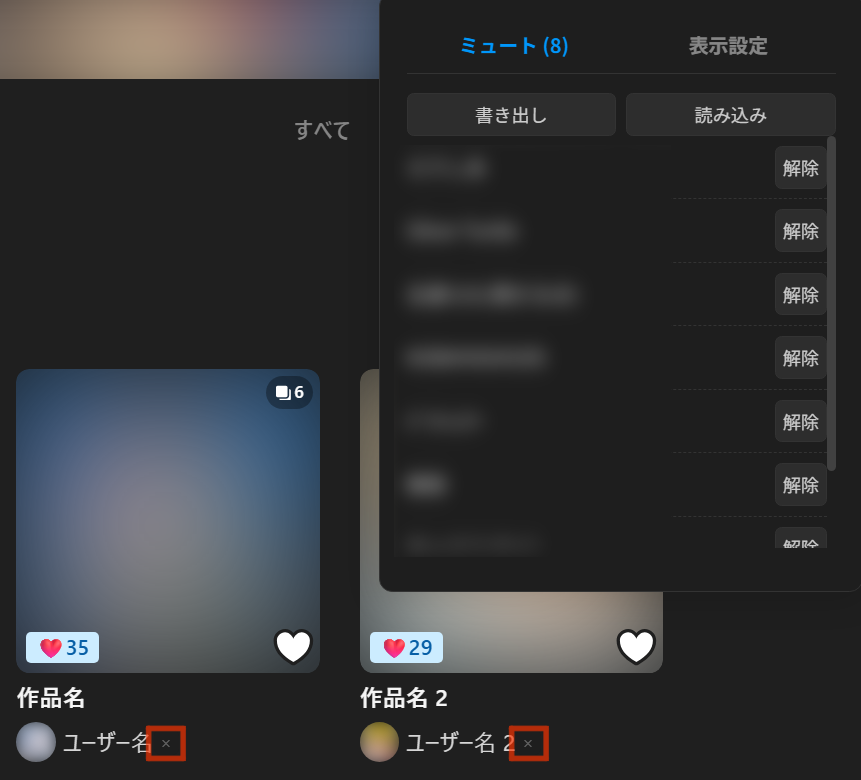
各作品のユーザー名の横に×ボタンが追加されます。
×ボタンをクリックすると赤い"Block"ボタンが表示され、さらにクリックするとそのユーザー名とユーザーIDがブロックリストに保存されます。
ブロックリストにユーザーIDが含まれるユーザーの作品は、検索結果から非表示されます。
右下にオプションメニューが追加されます。
ブロックリストはjsonファイルとして書き出し・読み込みができます。
検索結果上部に出る不要なUIを非表示にする機能もついています。
(ピクシブ百科事典・関連タグリスト・人気の作品・並び順変更)
ソースコード
// ==UserScript==
// @name         Pixiv Search Results Blocker
// @namespace    http://tampermonkey.net/
// @version      1.0
// @description  検索ページにて特定のユーザーをブロックします。Pixiv Previewerでの並び替えと共存できます。名前の横に×ボタン、右下にオプションメニューが追加されます。
// @author       Bookyakuno
// @match        https://www.pixiv.net/tags/*/artworks*
// @icon         https://www.google.com/s2/favicons?bb=pixiv.net
// @license MIT
// @grant        none
// ==/UserScript==

(function() {
  'use strict';

  const STORAGE_KEY = 'pixiv_custom_mute_list';
  const CONFIG_KEY = 'pixiv_custom_config';
  const MENU_ID = 'pm-menu-wrap';
  const TRIGGER_ID = 'pm-trigger-btn';

  let activeTab = 'mute';

  const DEFAULT_CONFIG = {
    hideEncyclopedia: true,
    hideRelatedTags: true,
    hidePopularWorks: true,
    hideSortOptions: true
  };

  const getMuteList = () => JSON.parse(localStorage.getItem(STORAGE_KEY) || '[]');
  const saveMuteList = (list) => {
    localStorage.setItem(STORAGE_KEY, JSON.stringify(list));
    updateMenuContent();
    refreshDisplay();
  };

  const getConfig = () => ({
    ...DEFAULT_CONFIG,
    ...JSON.parse(localStorage.getItem(CONFIG_KEY) || '{}')
  });
  const saveConfig = (config) => {
    localStorage.setItem(CONFIG_KEY, JSON.stringify(config));
    refreshDisplay();
  };

  const injectStyles = () => {
    if (document.getElementById('pm-styles')) return;
    const style = document.createElement('style');
    style.id = 'pm-styles';
    style.textContent = `
            :root {
                --pm-bg: #ffffff; --pm-text: #555555; --pm-border: #dddddd;
                --pm-btn-bg: #f5f5f5; --pm-btn-hover: #e8e8e8;
                --pm-accent: #0096fa;
                --pm-x-color: #999999; --pm-x-hover: #d9534f;
                --pm-trigger-bg: rgba(0, 0, 0, 0.4); --pm-trigger-text: #ffffff;
            }
            @media (prefers-color-scheme: dark) {
                :root {
                    --pm-bg: #1e1e1e; --pm-text: #cccccc; --pm-border: #333333;
                    --pm-btn-bg: #2d2d2d; --pm-btn-hover: #3d3d3d;
                    --pm-x-color: #666666; --pm-x-hover: #ff6b6b;
                    --pm-trigger-bg: rgba(255, 255, 255, 0.15); --pm-trigger-text: #cccccc;
                }
            }
/* 1. 親要素:名前とボタンを両端に配置 */
a[href*="/users/"], a[href*="id="], .ppAuthorLink {
    position: relative !important;
    display: flex !important;
    align-items: center;
    justify-content: space-between !important;
    width: 100% !important;
    max-width: 100%;
    box-sizing: border-box !important;
    text-align: left !important;
    overflow: visible !important; /* はみ出しを防止 */
}

/* 2. 名前テキスト部分:長すぎる場合に「...」にする */
/* aタグ直下のテキストノードやスパンを対象にするための設定 */
a[href*="/users/"] > *:not(.pm-mute-btn),
.ppAuthorLink > *:not(.pm-mute-btn) {
    overflow: hidden !important;
    text-overflow: ellipsis !important; /* 三点リーダーを表示 */
    white-space: nowrap !important;    /* 折り返し禁止 */
    flex-grow: 1;                      /* 可能な限り広がる */
}

/* 3. ×ボタン:サイズを固定して絶対に隠さない */
.pm-mute-btn {
    transform: none !important;
    flex-shrink: 0 !important; /* 重要:親が狭くなっても絶対に縮まない */

    background: var(--pm-bg);
    color: var(--pm-x-color);
    cursor: pointer;
    font-size: 11px;
    display: inline-flex;
    align-items: center;
    justify-content: center;
    width: 14px;
    height: 14px;

    border: 1px solid transparent; /* ガタつき防止 */
    border-radius: 4px;
    margin-left: 0px; /* 名前との最低限の余白 */
    z-index: 5;
    transition: all 0.1s ease-in-out;
}

.pm-mute-btn:hover {
    background: var(--pm-btn-hover);
    color: var(--pm-x-hover);
    border-color: var(--pm-x-hover);
}
/* 1回クリックした後のスタイル(Blockボタン) */
.pm-mute-btn.confirming {
    background: var(--pm-x-hover) !important;
    color: #fff !important;
    border-color: var(--pm-x-hover) !important;
    font-size: 9px;
    padding: 0 6px;
}


            #pm-menu-wrap {
                position: fixed; top: 60px; right: 20px; z-index: 10001;
                background: var(--pm-bg); color: var(--pm-text); border: 1px solid var(--pm-border);
                padding: 16px; box-shadow: 0 4px 20px rgba(0,0,0,0.15); border-radius: 8px;
                width: 260px; font-family: sans-serif; font-size: 12px; display: none;
            }
            .pm-tabs { display: flex; border-bottom: 1px solid var(--pm-border); margin-bottom: 12px; }
            .pm-tab { flex: 1; text-align: center; padding: 8px; cursor: pointer; opacity: 0.6; border-bottom: 2px solid transparent; font-weight: bold; }
            .pm-tab.active { opacity: 1; border-bottom: 2px solid faddMuteButtonsvar(--pm-accent); color: var(--pm-accent); }
            .pm-list-container { max-height: 250px; overflow-y: auto; margin-bottom: 10px; }
            .pm-list-item { display: flex; justify-content: space-between; align-items: center; padding: 6px 0; border-bottom: 1px dashed var(--pm-border); }
            .pm-action-row { display: flex; gap: 6px; margin-top: 10px; }
            .pm-action-btn { flex: 1; cursor: pointer; background: var(--pm-btn-bg); color: var(--pm-text); border: 1px solid var(--pm-border); border-radius: 4px; padding: 6px 4px; font-size: 11px; }
            .pm-config-item { display: flex; justify-content: space-between; align-items: center; padding: 8px 0; cursor: pointer; }
            #pm-trigger-btn {
                position: fixed; bottom: 20px; right: 20px; z-index: 10000;
                background: var(--pm-trigger-bg); color: var(--pm-trigger-text);
                width: 36px; height: 36px; border-radius: 50%; display: flex;
                align-items: center; justify-content: center; cursor: pointer;
                font-size: 18px; opacity: 0.3; transition: opacity 0.3s;
            }
            #pm-trigger-btn:hover { opacity: 1; }
        `;
    document.head.appendChild(style);
  };

  const refreshDisplay = () => {
    const config = getConfig();
    const muteIds = getMuteList().map(u => String(u.id));
    const userLinks = document.querySelectorAll('a[href*="/users/"], a[href*="id="]');
    userLinks.forEach(link => {
      const userIdMatch = link.getAttribute('href').match(/(?:id=|users\/)(\d+)/);
      if (userIdMatch) {
        const article = link.closest('li, [role="presentation"]');
        if (article) article.style.display = muteIds.includes(String(userIdMatch[1])) ? 'none' : '';
      }
    });
    const encyclopediaHeader = document.querySelector('div[data-ga4-label="header"]');
    if (encyclopediaHeader && encyclopediaHeader.querySelector('a[href*="dic.pixiv.net"]')) {
      encyclopediaHeader.style.display = config.hideEncyclopedia ? 'none' : '';
    }
    document.querySelectorAll('div[title^="#"]').forEach(div => {
      const parentUl = div.closest('ul');
      if (parentUl) {
        const wrapper = parentUl.closest('nav') || parentUl.parentElement;
        const val = config.hideRelatedTags ? 'none' : '';
        parentUl.style.display = val;
        if (wrapper && wrapper.tagName !== 'BODY') wrapper.style.display = val;
      }
    });
    document.querySelectorAll('h3').forEach(h3 => {
      if (h3.textContent.includes("人気の作品")) {
        const section = h3.closest('section');
        if (section) section.style.display = config.hidePopularWorks ? 'none' : '';
      }
    });
    const sortLabels = ["並び替え", "新着順", "人気順", "古い順"];
    document.querySelectorAll('button, a, span').forEach(el => {
      if (sortLabels.includes(el.textContent.trim())) {
        const container = el.closest('div');
        if (container && container.offsetWidth < 500) container.style.display = config.hideSortOptions ? 'none' : '';
      }
    });
  };

const addMuteButtons = () => {
    const userLinks = document.querySelectorAll('a[href*="id="], a[href*="/users/"], .ppAuthorLink');
    userLinks.forEach(link => {
      if (link.textContent.trim() === "" || link.querySelector('.pm-mute-btn')) return;

      const userId = (link.getAttribute('href').match(/(?:id=|users\/)(\d+)/) || [])[1];
      if (!userId) return;

      const btn = document.createElement('span');
      btn.className = 'pm-mute-btn';
      btn.textContent = '×';

      // 状態管理用のフラグ
      let isConfirming = false;

      btn.onclick = (e) => {
        e.preventDefault();
        e.stopPropagation();

        if (!isConfirming) {
          // 1回目のクリック:Blockボタンに変化
          isConfirming = true;
          btn.textContent = 'Block';
          btn.classList.add('confirming');
        } else {
          // 2回目のクリック:実行
          const userName = Array.from(link.childNodes)
            .filter(n => n.nodeType === Node.TEXT_NODE || (n.nodeType === Node.ELEMENT_NODE && n !== btn))
            .map(n => n.textContent).join('').trim();

          const list = getMuteList();
          if (!list.find(u => String(u.id) === String(userId))) {
            list.push({ id: userId, name: userName });
            saveMuteList(list);
          }
        }
      };

      // マウスが離れたら元に戻す(キャンセル扱い)
      btn.onmouseleave = () => {
        if (isConfirming) {
          isConfirming = false;
          btn.textContent = '×';
          btn.classList.remove('confirming');
        }
      };

      link.appendChild(btn);
    });
  };


  const updateMenuContent = () => {
    const wrap = document.getElementById(MENU_ID);
    if (!wrap) return;

    const config = getConfig();
    const muteList = getMuteList();

    wrap.innerHTML = `
            <div class="pm-tabs">
              <div class="pm-tab ${activeTab === 'mute' ? 'active' : ''}" data-tab="mute">ミュート (${muteList.length})</div>
                <div class="pm-tab ${activeTab === 'config' ? 'active' : ''}" data-tab="config">表示設定</div>
            </div>
            <div id="pm-tab-content"></div>
        `;

    const contentContainer = wrap.querySelector('#pm-tab-content');
    if (activeTab === 'config') {
      contentContainer.innerHTML = '<div id="pm-config-container"></div>';
      const opts = [{
          key: 'hideEncyclopedia',
          label: 'ピクシブ百科事典'
        },
        {
          key: 'hideRelatedTags',
          label: '関連タグリスト'
        },
        {
          key: 'hidePopularWorks',
          label: '人気の作品'
        },
        {
          key: 'hideSortOptions',
          label: '並び順変更'
        }
      ];
      opts.forEach(opt => {
        const row = document.createElement('label');
        row.className = 'pm-config-item';
        row.innerHTML = `<span>${opt.label}を隠す</span><input type="checkbox" ${config[opt.key] ? 'checked' : ''}>`;
        row.querySelector('input').onchange = (e) => {
          config[opt.key] = e.target.checked;
          saveConfig(config);
        };
        contentContainer.querySelector('#pm-config-container').appendChild(row);
      });
    } else {
      contentContainer.innerHTML = `
                <div class="pm-action-row">
                    <button id="pm-export-btn" class="pm-action-btn">書き出し</button>
                    <button id="pm-import-btn" class="pm-action-btn">読み込み</button>
                </div>
                <div id="pm-list-container" class="pm-list-container"></div>
            `;
      const listContainer = contentContainer.querySelector('#pm-list-container');
      if (muteList.length === 0) {
        listContainer.innerHTML = '<p style="text-align:center; opacity:0.5; margin-top:20px;">ミュートなし</p>';
      } else {
        muteList.forEach((user, index) => {
          const item = document.createElement('div');
          item.className = 'pm-list-item';
          item.innerHTML = `<span style="flex-grow:1; overflow:hidden; text-overflow:ellipsis; white-space:nowrap;">${user.name}</span>`;
          const delBtn = document.createElement('button');
          delBtn.textContent = '解除';
          delBtn.className = 'pm-action-btn';
          delBtn.style.flex = 'none';
          delBtn.onclick = (e) => {
            e.stopPropagation();
            muteList.splice(index, 1);
            saveMuteList(muteList);
          };
          item.appendChild(delBtn);
          listContainer.appendChild(item);
        });
      }

      // --- ボタンの存在確認をしてからイベントを設定 ---
      const exportBtn = contentContainer.querySelector('#pm-export-btn');
      if (exportBtn) {
        exportBtn.onclick = (e) => {
          e.stopPropagation();
          const blob = new Blob([JSON.stringify(muteList, null, 2)], {
            type: 'application/json'
          });
          const a = document.createElement('a');
          a.href = URL.createObjectURL(blob);
          a.download = `pixiv_mute_list_${new Date().toISOString().split('T')[0]}.json`;
          a.click();
        };
      }

      const importBtn = contentContainer.querySelector('#pm-import-btn');
      if (importBtn) {
        importBtn.onclick = (e) => {
          e.stopPropagation();
          const input = document.createElement('input');
          input.type = 'file';
          input.accept = '.json';
          input.onchange = (ev) => {
            const file = ev.target.files[0];
            if (!file) return;
            const reader = new FileReader();
            reader.onload = (rev) => {
              try {
                const rawData = rev.target.result.trim(); // 空白除去
                const imported = JSON.parse(rawData);
                if (!Array.isArray(imported)) throw new Error('データが配列形式ではありません');
                if (confirm(`${imported.length}件読み込みますか?`)) {
                  const newList = [...getMuteList()];
                  imported.forEach(u => {
                    if (u.id && !newList.find(curr => String(curr.id) === String(u.id))) newList.push(u);
                  });
                  saveMuteList(newList);
                }
              } catch (err) {
                alert('読み込み失敗:' + err.message);
              }
            };
            reader.readAsText(file);
          };
          input.click();
        };
      }
    }

    wrap.querySelectorAll('.pm-tab').forEach(tab => {
      tab.onclick = (e) => {
        e.stopPropagation();
        activeTab = tab.dataset.tab;
        updateMenuContent();
      };
    });

    const closeBtn = wrap.querySelector('#pm-close-btn');
    if (closeBtn) closeBtn.onclick = () => wrap.style.display = 'none';
  };
  const createMenu = () => {
    if (document.getElementById(MENU_ID)) return;
    injectStyles();
    const menu = document.createElement('div');
    menu.id = MENU_ID;
    document.body.appendChild(menu);

    const trigger = document.createElement('div');
    trigger.id = TRIGGER_ID;
    trigger.innerHTML = '⚙️';
    trigger.onclick = (e) => {
      e.stopPropagation();
      const isVisible = menu.style.display === 'block';
      menu.style.display = isVisible ? 'none' : 'block';
      if (!isVisible) updateMenuContent();
    };
    document.body.appendChild(trigger);

    document.addEventListener('click', (e) => {
      const menuEl = document.getElementById(MENU_ID);
      const triggerEl = document.getElementById(TRIGGER_ID);
      if (menuEl && menuEl.style.display === 'block') {
        // クリックされたのがメニュー内でも、歯車ボタンでもない場合に閉じる
        if (!menuEl.contains(e.target) && !triggerEl.contains(e.target)) {
          menuEl.style.display = 'none';
        }
      }
    });
  };

  const main = () => {
    addMuteButtons();
    refreshDisplay();
  };
  createMenu();
  const observer = new MutationObserver(main);
  observer.observe(document.body, {
    childList: true,
    subtree: true
  });
  main();
  setInterval(main, 1500);
})();
経緯
ブロック機能を持つユーザースクリプトはあるにはあるが、Pixiv Previewerの人気順ソート機能と併用すると正しく動作してくれない問題があった。
Pixiv Previewer自体にもブロック機能はあるが、手動でユーザーIDを登録する必要があり面倒だった。
GeminiのAIコーディングエージェントでかなり手軽にコーディングできるようになったので今回の機能を作成した。